
How to Check Your Visayan Electric (VECO) Bill Online
Serving Cebu City, Mandaue, Talisay, Naga, and nearby municipalities, Visayan Electric runs its own app and online tools — completely separate from Meralco’s. Here’s exactly how it works, with the real app screens along the way.
Who This Is For
 Visayan Electric (VECO) is a separate distribution utility from Meralco, serving Cebu City, Mandaue City, Talisay City, Naga City, and the municipalities of Liloan, Consolacion, Minglanilla, and San Fernando. If your electric bill says “Visayan Electric” and not “Meralco,” this guide — not a Meralco one — is what applies to you.
MobileAP isn’t exclusive to VECO, either. It’s the shared app AboitizPower built for several of its distribution utilities, so if you have family or property under Davao Light, Cotabato Light, Subic Enerzone, or Lima Enerzone, the same app and the same steps below apply to them too.
Visayan Electric (VECO) is a separate distribution utility from Meralco, serving Cebu City, Mandaue City, Talisay City, Naga City, and the municipalities of Liloan, Consolacion, Minglanilla, and San Fernando. If your electric bill says “Visayan Electric” and not “Meralco,” this guide — not a Meralco one — is what applies to you.
MobileAP isn’t exclusive to VECO, either. It’s the shared app AboitizPower built for several of its distribution utilities, so if you have family or property under Davao Light, Cotabato Light, Subic Enerzone, or Lima Enerzone, the same app and the same steps below apply to them too.
Getting Started, Step by Step
Download and register
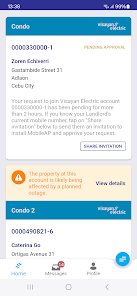
MobileAP is free on the App Store and Google Play — search “MobileAP AboitizPower” if “VECO” alone doesn’t surface it. During setup, you’ll register using your VECO account number, which appears in a 10-digit-plus-check-digit format (for example, 0000110000-7).
Once registered, your account name, service address, and account number appear right on the home screen — along with a live notice if your address is affected by any planned outage.
Check your current and past bills
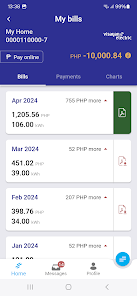
The Bills tab lists each billing month with the amount due and your kWh consumption for that period, plus a document icon to open or download a PDF copy — useful if you need a copy for your own records or for a third-party payment channel that asks for a reference number.
Review your payment history
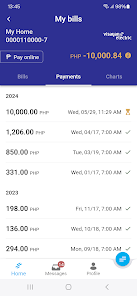
The Payments tab keeps a running record of what you’ve paid and when, which is worth checking before contacting VECO about a payment you’re not sure posted correctly.
Track your consumption trend
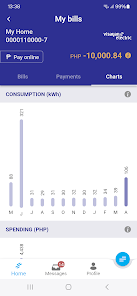
The Charts tab plots your kWh consumption and peso spending across recent months side by side, which makes a real usage spike easy to spot at a glance instead of hunting through old bills.
If You’re Not Sure Which Utility You’re With
Frequently Asked Questions
Need VECO’s contact details?
Hotline, email, and service center information for Cebu-area customers.
VECO Customer Service