
SIN vs Reference Number vs Account Number: Which Meralco Number Do You Need?
Three different numbers, three different jobs — and using the wrong one is the most common reason a form or payment gets rejected. Below is exactly where each one sits on a real Meralco bill.
SINidentifies your service connection or meter
CANidentifies your overall account
MRNidentifies this month’s specific bill
The Short Version
Every Meralco bill actually carries three different identifiers, and each one answers a different question:
- Service ID Number (SIN) — “which service connection is this?” Stays the same for as long as that connection exists. It identifies the meter and the physical address, not you personally, which matters if you ever own or manage more than one property.
- Customer Account Number (CAN) — “whose account is this?” Represents your overall relationship with Meralco. A single CAN can be linked to one service, and in some cases more than one, depending on how your account was set up.
- Meralco Reference Number (MRN) — “which specific bill is this payment for?” Unlike the other two, this one is disposable by design: it’s generated fresh for that billing cycle and exists purely so a payment can be matched to the correct statement.
Where Each One Actually Sits on Your Bill
Your Service ID Number (SIN)
Printed on your bill near your account details section — this is the exact spot to look, cropped from a real Meralco billing statement.
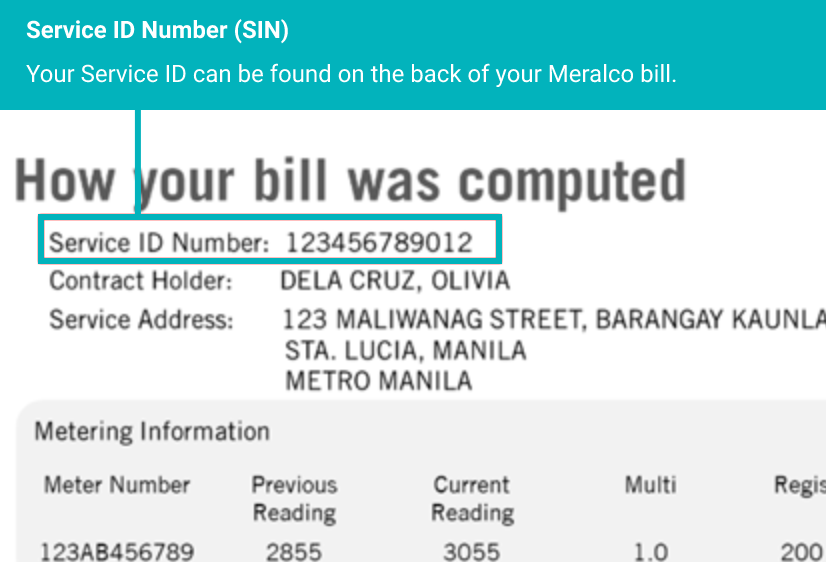
Where the SIN appears on an actual Meralco billing statement
Constant
Your Customer Account Number (CAN)
Displayed on the same bill, usually right alongside the SIN — the two are easy to mix up because they sit so close together.
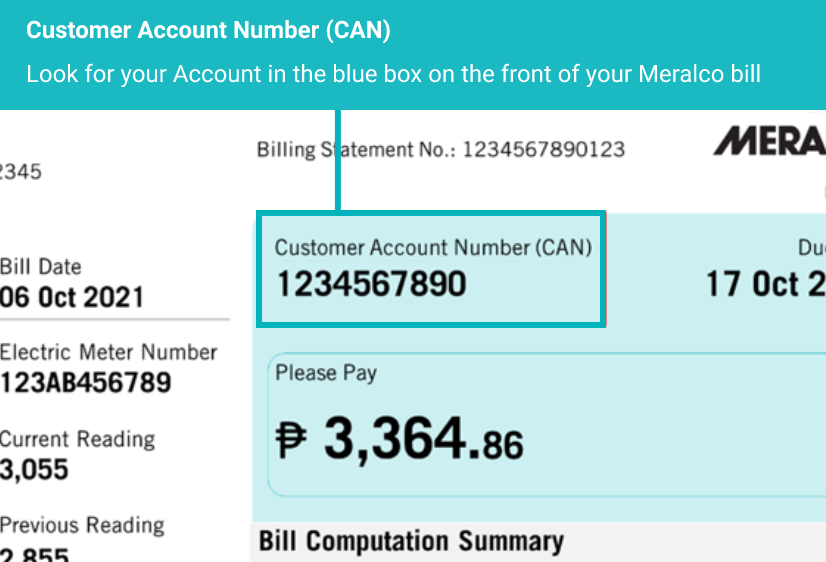
Where the CAN appears, next to the SIN
Constant
Side-by-Side Comparison
| Number | What it identifies | Does it change? | When you’ll need it |
|---|---|---|---|
| Service ID Number (SIN) | Your specific meter / service connection | No — stays constant per service | Updating contact info, enrolling in notifications, account concerns |
| Customer Account Number (CAN) | Your overall Meralco account | No — stays constant per account | General account inquiries, most payment channels |
| Meralco Reference Number (MRN) | One specific monthly bill | Yes — changes every billing cycle | Paying through banks or third-party payment channels |
The single most common mix-up: using last month’s Reference Number to pay this month’s bill. Because the MRN changes every cycle, always grab it fresh from your most recent bill before paying through a bank or third-party app.
Why Meralco Splits These Into Three Numbers At All
It looks like unnecessary complexity until you consider what each one protects against. If Meralco only used one number for everything, a single mistake — like a typo when updating contact details — could misapply to the wrong bill, the wrong meter, or even the wrong customer account entirely.
Separating them contains the damage: get the SIN wrong and you might update the wrong service address, but your payment history stays intact. Get the MRN wrong on a payment and it might just delay that one bill’s posting, without touching your account details at all. It’s a deliberate design choice most banking and utility systems use for the same reason.
Frequently Asked Questions
1. Can I use my CAN instead of my SIN?+
No — they identify different things. Some processes ask for both together, since CAN identifies your account and SIN identifies the specific service.
2. Why does my reference number keep changing?+
The Reference Number (MRN) is tied to one specific bill, not to your account. A new one is generated every billing cycle.
3. Which number do I need to pay my bill through GCash or a bank?+
Most third-party and bank payment channels ask for your current Meralco Reference Number (MRN), since it identifies exactly which bill you’re paying.
4. Can my SIN change if I move to a new address?+
A new address means a new service connection, so it would have its own new SIN — the old one stays tied to the previous address.
5. I have multiple properties with Meralco — do they share one CAN?+
Typically each service location has its own CAN and SIN, even if they’re all under your name.
6. What happens if I enter the wrong reference number when paying?+
Your payment may not be matched to the correct bill, which can delay posting and, in disconnection situations, delay reconnection.
7. Is my CAN the same as my meter number?+
No — the meter itself is a separate physical identifier. Your SIN is what Meralco uses to identify the service connection tied to that meter.
8. Can I find these numbers without my paper bill?+
Yes — your SIN and CAN are also visible in your My Meralco online account details page if you’ve registered.
Need to look one up right now?
Full step-by-step guides for finding each number on your bill.
Find Your SIN Find Your Reference Number