
Meralco Reference Number: Where to Locate It on Your Bill
Understand what the Meralco Reference Number (MRN) is, where to find it on your bill, and how to use it for bill payments and account verification.
What is a Meralco Reference Number (MRN)?
The Meralco Reference Number (MRN) is a unique number assigned to each billing statement issued by Meralco. It is used primarily for payment processing and ensures that your payment is correctly matched to your specific bill.
Unlike your Customer Account Number (CAN), which remains constant, the MRN can change with each billing cycle. This means every monthly bill may have a different reference number tied to it. Because of this, it is important to always use the MRN from your most recent bill when making payments.
The MRN is commonly required when paying through certain platforms, especially third-party payment channels. It helps prevent errors and ensures accurate posting of payments.
Where to Find the MRN on Your Bill
1. Check the Bottom Section of Your Bill
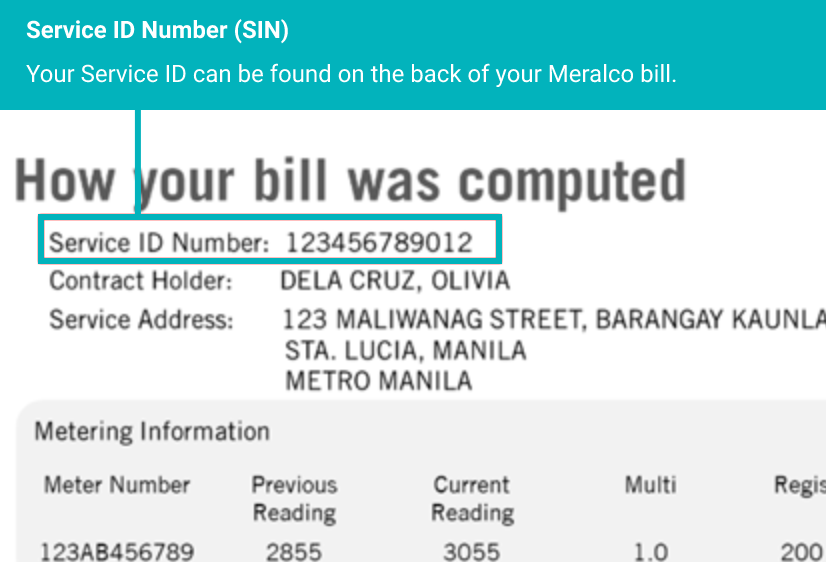
The Meralco Reference Number is usually located near the bottom portion of your billing statement, close to the payment details section.
2. Look Near Payment Information
It is often grouped with other payment-related details such as the amount due, due date, and barcode. This placement makes it easy to reference when making payments.
3. Check the Digital Bill (Online or App)
If you access your bill through the Meralco app or online account, the MRN is displayed in the same section as your billing details. Navigate to your latest bill and review the payment section carefully.
How to Use Your MRN
The MRN is mainly used when paying your Meralco bill through specific channels. Some payment platforms require this number instead of your account number to process transactions.
When entering your MRN, ensure that you copy it exactly as shown on your bill. Even a small mistake can result in failed transactions or delays in payment posting.
It is also recommended to pay the exact amount associated with the MRN. Since the MRN is linked to a specific billing period, partial or incorrect amounts may lead to issues.
Important Tips
Always use the latest MRN from your most recent bill. Avoid using old reference numbers, as they may no longer be valid.
Double-check all digits before confirming any payment. Keep your receipt or reference number after completing a transaction.
If your payment does not reflect immediately, wait for the standard processing time and verify using your transaction receipt.
Using the correct MRN ensures your payment is properly credited and avoids unnecessary delays or account issues.
Common Issues and Solutions
One common issue users face is entering an incorrect MRN. This can result in payment errors or delays. Always verify your details before submitting.
Another issue is using an outdated MRN from a previous bill. Since MRNs can change monthly, always refer to your latest statement.
If your payment is deducted but not reflected, check your transaction history and contact support with your reference number.
Frequently Asked Questions
1. What is MRN in Meralco?+
It is a unique number used for bill payment processing.
2. Is MRN the same as CAN?+
No, CAN is permanent while MRN changes per bill.
3. Where can I find MRN?+
On your bill, usually near the payment section.
4. Can I use old MRN?+
No, always use the latest one.
5. Is MRN required for payment?+
Some platforms require it, others use CAN.
6. Can MRN change monthly?+
Yes, it usually changes with each bill.
7. What if I enter wrong MRN?+
Your payment may fail or go to the wrong bill.
8. Is MRN in the app?+
Yes, visible in your digital bill.
9. Can I pay without MRN?+
Yes, some methods use account number instead.
10. Is MRN safe to share?+
Only share with trusted payment platforms.
11. How many digits is MRN?+
It varies depending on the bill.
12. Why is MRN important?+
It ensures accurate payment matching.
13. Can I find MRN via SMS?+
Sometimes included in notifications.
14. What if payment not posted?+
Wait processing time or contact support.
15. Is MRN needed for support?+
It may be required for payment inquiries.