
Meralco Service ID Number (SIN): How to Find Your SIN
Learn what the Meralco Service ID Number (SIN) is, where to find it on your bill, and how to use it for account updates, notifications, and payments.
What is a Meralco Service ID Number (SIN)?
The Meralco Service ID Number (SIN) is a unique identifier assigned to your electricity service connection. It is different from your Customer Account Number (CAN), although both are important for managing your account.
The SIN is primarily used to identify a specific service location or meter, while the CAN represents your overall account. This distinction is important, especially for customers managing multiple properties or service connections.
You will often be asked to provide your SIN when updating your contact details, enrolling in notifications, or resolving account concerns. Because of this, knowing where to find it quickly can save you time and prevent errors.
Where to Find Your SIN
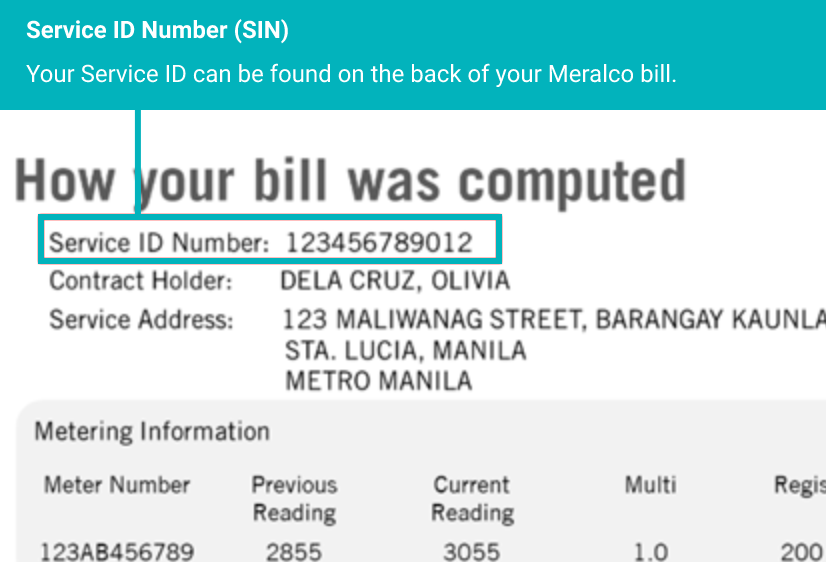
1. Check Your Meralco Bill
Your Service ID Number is printed directly on your Meralco bill. It is usually located near your account details section.
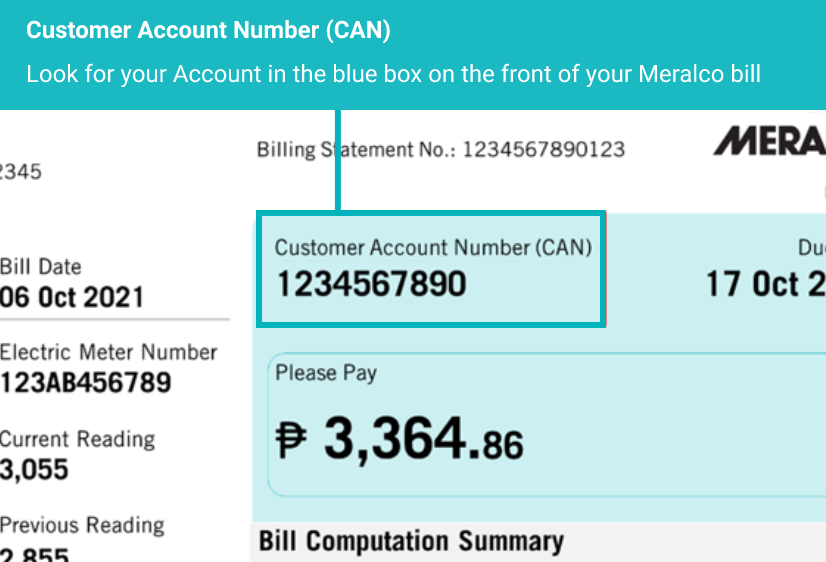
2. Locate Your Account Number (CAN)
The Customer Account Number (CAN) is also displayed on your bill. While it is different from your SIN, both numbers are often required together.
3. Use the Meralco App or Online Account
If you have access to your online Meralco account, you can find your SIN by navigating to your account details page. Tap your account tile and scroll to view full details.
4. Contact Meralco Support
If you cannot locate your SIN, you can contact Meralco customer support. Be ready to provide your account number and personal details for verification.
Why Your SIN is Important
Your Service ID Number plays a key role in managing your electricity account. It allows Meralco to accurately identify your service connection, ensuring that updates, payments, and notifications are correctly applied.
For example, when updating your contact details, you may be asked to provide both your CAN and SIN. This ensures that bill notifications, payment reminders, and important alerts are sent to the correct account.
Without the correct SIN, there is a risk of delays or errors in processing requests. That is why it is important to always double-check your information before submitting any forms.
How to Update Your Contact Details
Updating your contact information with Meralco ensures you receive important updates such as bill availability and payment reminders.
To update:
- Prepare your CAN and SIN
- Visit the official Meralco update form
- Enter your details accurately
- Submit and confirm
Once updated, you will start receiving SMS and email notifications about your bills and payments.
Common Mistakes to Avoid
Entering incorrect numbers is one of the most common issues. Always double-check your SIN and CAN before submitting any form. Avoid mixing them up, as they serve different purposes.
Another mistake is relying on outdated bills. Always use your most recent bill to ensure accuracy.
Frequently Asked Questions
1. What is SIN in Meralco?+
It is the Service ID Number used to identify your electricity connection.
2. Is SIN the same as CAN?+
No, SIN identifies the service, while CAN identifies your account.
3. Where can I find my SIN?+
On your Meralco bill or account dashboard.
4. Can I find SIN online?+
Yes, through your Meralco account.
5. What if I lost my bill?+
Use the app or contact support.
6. Is SIN required for payment?+
Usually CAN is enough, but SIN may be required for updates.
7. Can I share my SIN?+
Only share with trusted platforms.
8. How many digits is SIN?+
It varies depending on your account.
9. Why is SIN important?+
It ensures correct service identification.
10. Can SIN change?+
It typically remains constant per service.
11. Can I have multiple SINs?+
Yes, if you have multiple service locations.
12. What happens if I enter wrong SIN?+
Your request may fail or be misapplied.
13. Is SIN needed for support?+
Yes, it helps identify your service quickly.
14. Can I update details without SIN?+
Some processes require it for verification.
15. What is the safest way to store SIN?+
Keep it in a secure personal record.